Rack elevation, cabling design, conduits and power in a single project model.
The software checks compliance, runs the calculations and prepares the handover.
Not on sale yet. We are selecting a small group of testers — at most two per country.
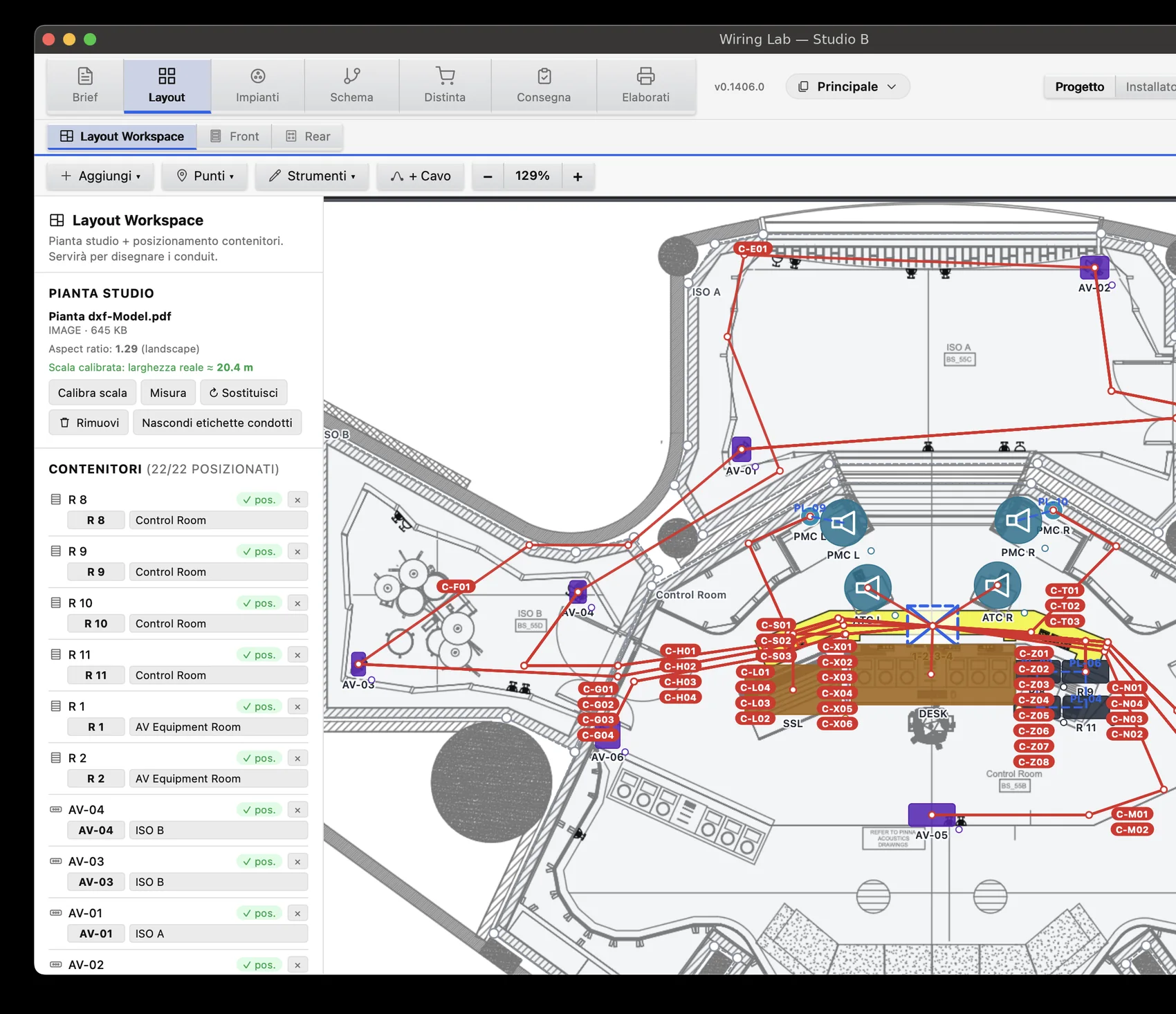
You import the plan and draw the cabling in the same place: cable routes come out of the drawing, lengths out of the conduits, the bill of materials out of what you actually installed. Nothing is retyped in between.
89 live checks against TIA, AVIXA, EN 50174-2, IEC 60364 and CEI 64-8, NEC, AES and IEEE. Errors and warnings quote the standard, exceptions can be justified one by one, and the report exports.
Impedances, 70/100 V lines with loss in dB, minimum conductor sizes, ampacity, BTU, conduit fill, AoIP bandwidth and latency, fibre loss budget. Every result states its formula and its standard.
The project is a file on your own disk, carrying its photos, plans and the library it used. It works on site with no network, and your clients' data never passes through a supplier.
Commissioning, a signable certificate, a punch list with photos, manuals, labels, the installer's pack. Handover is not a separate job: it comes out of the design you have already done.
Every number you read in Wiring Lab comes out of a physical formula or a cited standard — never out of a generative model. The algorithms are deterministic: the same data always gives the same result, and you can reproduce that result by hand on paper.
And where the data is missing, the software does not invent it: with no scale on the plan it will not give you metres, with no transformer tap it will not guess the power, and a connector whose dimensions it has not verified comes out with a "to be verified" note instead of invented holes. An empty cell beats a plausible wrong number.
The application follows the real flow of a system: requirements, diagrams, plan, services, bill of materials, commissioning, drawings.
Every area works on the same data, so nothing is entered twice.
From the client's details to the questionnaires that work out what is really needed, through to the site survey with its photos. At the end the Program Report writes itself from what you have already entered, and the scope of work states in black and white what is in and what is out.
Every diagram in the project, generated from the data rather than redrawn by hand: block diagram, signal flow, network topology. The single-line diagram comes out with no crossings — guaranteed by the engine, not by patience — and the loudspeaker diagram shows the taps and the amplifier power check.
Import the floor plan as DXF or PDF and Wiring Lab reads the dimensions automatically. If the document does not carry them, you set the scale by giving the length of one known wall, and everything else follows. Then you draw rooms, conduits and markers.
Racks are built up in front and rear elevation, down to half, third and quarter rack units. The plan can live on a second screen, in a window of its own, editable and synchronised live: you draw the route on the layout and the metres reach the cables and the conduits.
The heart of the application. You connect ports with the mouse, multicore looms step through channel by channel on their own, and ports already in use cannot be rewired by mistake.
Cables are distributed into the conduits and every conduit reports how full it is. Outlets, power strips and PDUs are mapped, and the cable schedule keeps itself up to date.
One bill of materials for the whole project, mounting hardware included, with spares and client-supplied material kept separate. The quotation adds labour, with installation times by connector type.
Test plan, signable acceptance certificate, punch list with the photos inside the PDF, method statement, warranties and expiry dates. The operation and maintenance manuals are partly generated automatically from the project data: you finish the rest rather than starting from a blank page.
Thirteen drawing types, from A4 to A0, with the title block and the revisions. The software lays them out; you choose which ones.
And then the installer's pack: the thing other programs do not give you. Whoever installs it should not have to read the design, they need a few pages with everything they need — a worksheet with boxes to tick cable by cable (pulled, terminated A, terminated B, tested), patch list, conduit schedule and labels. One folder, to print and take to site.
What matters is not how many products are in it, but how well they are described and how easily you can add your own. Cables carry their real construction: AWG, outside diameter, pairs, screen, jacket, minimum bend radius — the data the calculations need.
Your own catalogue imports from CSV or JSON with a column mapping you save and reuse, and duplicates are recognised. A front panel that is missing can be traced from a photograph with the Panel Tracer, and wall panels come out in DXF with a dimensioned drilling template.
Every check has a code, a severity — error, warning or note — and the standard behind it. You can accept a single exception by giving a reason, and take the report away to attach to the drawing set.
See the full list, country by country →
Fill over the limit, power and signal in the same conduit (an error, not a warning), bend radius, a cable changing room with no conduit.
PDU beyond its fuse, the 80% continuous-load limit exceeded, different voltages in the same rack, not enough outlets, voltage drop.
Checks that the grounding network is a single one, not broken into separate islands that never meet: isolated nodes, bonds with no declared size, undersized conductors, a missing reference to the building ground.
Overrunning the rack units, collisions, equipment deeper than the rack, heat load. Good-practice advice stays advice, not a red alarm.
AoIP with no VLAN or sitting on the management VLAN, overlapping subnets, missing IGMP querier, a static address inside the DHCP pool, PoE budget.
MADI beyond 64 channels, +4 dBu against −10 dBV levels, loudspeaker impedance against the amplifier, constant-voltage line loss, ST 2110, NDI, HDBaseT beyond 100 m.
The drawing below is a real export from the software, not an illustration: one project page output as SVG, with the names changed. Open formats, no locks: the project stays readable outside Wiring Lab too.
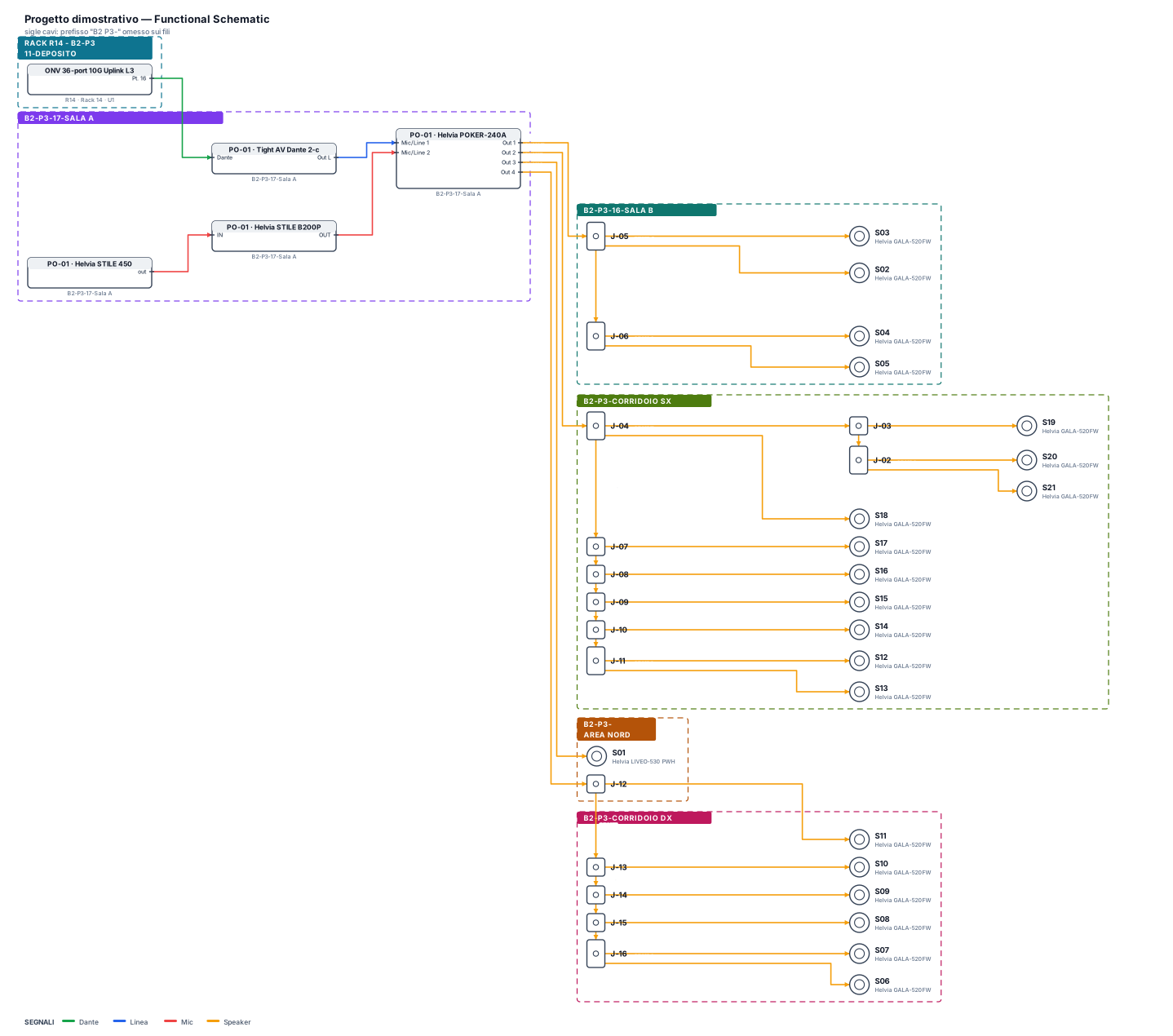
Drawings with a title block from A4 to A0, racks front and rear, vector plan, cable and conduit schedules, bill of materials, the checks report, signable certificates.
Rack elevation at true EIA-310 dimensions, plan, wall panels and the drilling template for the workshop. Our own DXF engine, offline, sharp at any magnification.
Block diagram, single-line diagram, network topology, grounding diagram, backbones, wall panels. Pure vector, ready to lay out.
Bill of materials, cable schedule, patch list, conduits, installer worksheets, labels for professional printers. Manuals in Markdown, handover pack as a ZIP.
Most AV design tools stop at the drawing and the documentation. Wiring Lab goes further: it checks compliance, runs the calculations and stays with you through commissioning and handover.
Wiring Lab checks the design while you draw it, and for every check it tells you which standard it comes from: TIA-606-C, TIA-607-D, TIA-569-D, EN 50174-2, the AVIXA standards, IEC 60364 and NEC. An issues panel with scopes and severities, exceptions justified and recorded, a report to attach to the drawing set.
And where we do not have a country's tables, we say so: a number borrowed from another standard would be worse than no number at all.
You import the floor plan, the software reads its dimensions, you draw rooms and conduits. If there is no plan, you start from a blank sheet.
You build the racks, connect the ports, distribute the cables into the conduits. The lengths come from the route you drew.
The checks run by themselves on the project's real data. You close the errors and justify the exceptions.
Drawing set, bill of materials, labels, commissioning certificate and manuals. One single pack, with the project file inside it.
You cannot buy yet: we are collecting tester applications and the addresses of people who want to be told when it is out. The prices below are the ones we will open sales with.
152 features, area by area, each with its description and a note on the ones still to be written.
Wiring Lab can let the assistant you already use read the open project, through an
open standard. The numbers stay the ones the software calculated: the assistant reads them, it does not invent them. You decide
what it may see, and the link switches off whenever you want.
How the link works →
macOS and Windows, available from the same day. On the Mac the build is universal, for Apple Silicon and Intel.
No. It is perpetual: you pay once and the version you have stays yours for good, offline too. Twelve months of software and catalogue updates are included; after that, if you want the new versions, the renewal costs €129 a year and is optional — or you do nothing and keep the version you have.
Audio covers the audio design of one or more rooms on the same floor: plan, racks, cabling, conduits, electrical services, 70 and 100 V distribution, all the standards checks, labelling, bill of materials and drawings. Pro adds what grows with the job: multiple floors and buildings, DXF export for CAD, network design and audio over IP, video, and the commercial side — quotation, tender, commissioning and the handover set. They are the same program: moving from Audio to Pro means reinstalling nothing.
No. Wiring Lab is a desktop application and the project is a file on your own disk, wherever you choose to put it. You do not need a network to work, and your clients' data never passes through us. There is no usage telemetry either: there is one anonymous usage count — never names, clients or project content, and your IP address is not kept.
No, and that is not an oversight. Every calculation is a physical formula or a rule from a standard, written into the code: deterministic, repeatable and checkable by hand. A generative model can give a different number every time, and nobody knows where it came from. On a system that has to stand up, that is not an acceptable trade-off.
Yes. Cables, connectors, adapters and price lists import from CSV or JSON with a column mapping you save as a profile and reuse. Duplicates are recognised instead of multiplying.
Italian, English, Slovenian, French, German and Spanish.